
Stop Writing Walls of Text: How Paragraph Structure Shapes What Readers Do
Ever opened a document and just stared at a big block of text and thought, “Nope, not today”? That’s what people mean when they talk about a “wall of text” — and it’s something that can turn even the most interested reader away. These days, most of us don’t sit and read every word. We skim. We scan. We want the key points, fast. So your paragraph structure isn’t just about how it looks; it basically decides if someone sticks around or bounces out.
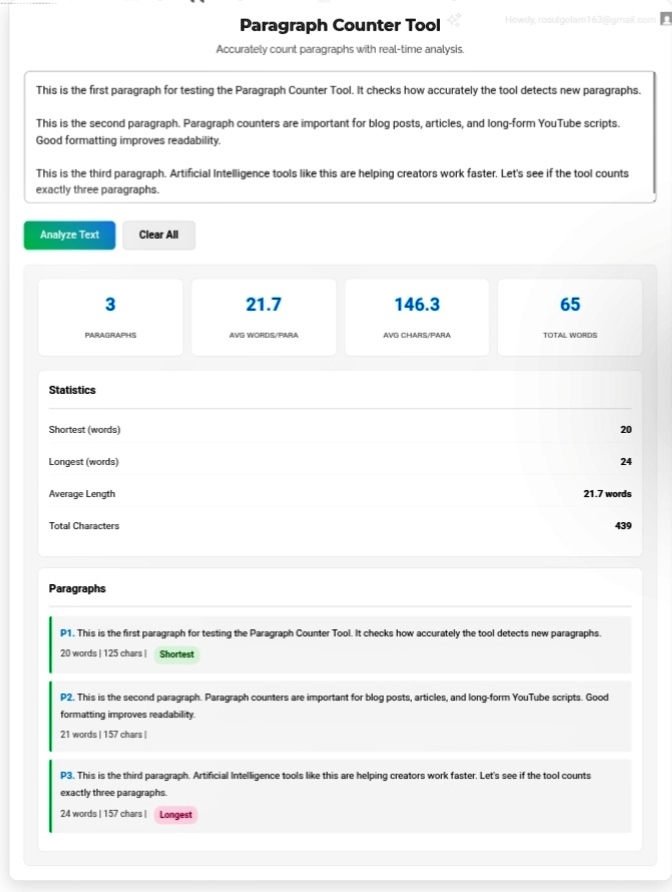
That’s where a tool like the Paragraph Counter comes in. It’s not just crunching numbers—it helps you spot where your formatting needs help, keeps your text balanced, and lets you tweak things while you write.
Why Paragraph Length Matters
People remember things better when they get the information in bite-sized pieces. That’s just how our brains work. When paragraphs are short and the page has plenty of white space, it’s way less tiring for your eyes—and you actually understand more. Sometimes, a single line gets the message across; other times, you need a few sentences in a block to set the scene. Done right, breaks and spacing pull the reader from top to bottom without effort.
What Does This Tool Actually Do?
It’s more than a simple paragraph counter. Here’s what it checks:
- Average words per paragraph, so you see if your pacing’s consistent.
- Shortest and longest segments, making it easy to spot extremes and see if you’re using them for emphasis.
- Character density per paragraph, showing which chunks feel crammed and which breathe.
- Visual classification, automatically tagging parts as “short,” “medium,” or “long” based on standard benchmarks.
With these stats, editing stops feeling subjective—you can see what’s working and fix what’s not in a repeatable way.
Who Needs Paragraph Analytics?
- Bloggers and content marketers want their posts to be easy to skim—because people stick around longer, and rankings go up.
- Academic and technical writers deal with heavy ideas. They need every bit of structural breathing room to keep things clear.
- Scriptwriters and video creators rely on breaks to pace their voiceovers naturally.
- UX writers and microcopy designers know every line counts. They can’t afford huge blocks that drown out important info.
Tips for Better Paragraphs
- Stick to 2–5 sentences per chunk. Sometimes you’ll want a single-sentence for effect, but steady rhythm keeps things readable.
- Mix it up. Drop a one-liner after data dumps to refocus attention.
- Don’t go past 8 lines in a row without a break. On a phone, that’s a full screen—nobody wants to scroll through a giant block.
- Structure paragraphs based on how easily people can scan them. Use headings, bullets, italics, spaces—whatever helps.
Mistakes That Destroy Engagement
- Shoving too much info into one block.
- Using line breaks instead of proper paragraphs.
- Forgetting how text looks on phones.
- Obsessing over tidy formatting instead of making things easy to read.
The Paragraph Counter takes the guesswork out. It’ll show you exactly where your structure helps or hurts.
The Bottom Line
Formatting isn’t about making things pretty. It’s about helping people navigate your content and actually understand it. Every paragraph break shows readers where to look next. Start thinking of paragraphs as tools, not just spots to start a new line, and your writing instantly gets easier to read, remember, and share.
Audit your drafts on the fly and publish confidently.https://seobricxtool.com/4902-2/
