
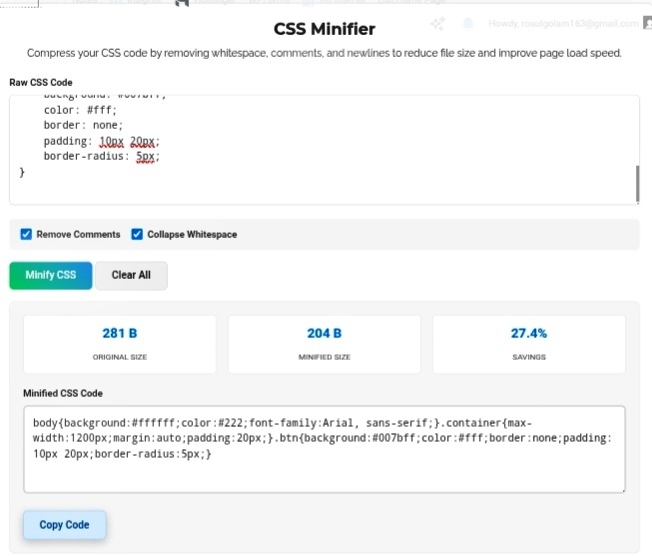
If JavaScript is the brain of your website, CSS is basically the outfit. And let’s be honest — some websites are wearing way too many layers. Style sheets start small, then suddenly they’re 500 lines deep with colors you’ve forgotten about, dimensions that made sense three redesigns ago, and layout rules fighting each other. Loading all that bloat? It causes this ugly thing called “flash of unstyled content” — FOUC for short — where your page briefly looks like a naked HTML skeleton before the styles kick in. Not a great first impression. The CSS Minifier fixes this by squeezing your styles down to the absolute essentials.
What Actually Gets Stripped Out?
Here’s the thing — browsers don’t care about your pretty code. They parse CSS character by character, and every extra space is just wasted processing power. Our minifier targets three specific wastes of space:
Comments — All those /* Main Container */ notes you left for yourself? Gone. The browser never read them anyway.
Whitespace — Those tabs and indents that made your nested rules look beautiful? Deleted. Your eyes loved them. The browser ignored them.
Newlines — Multiple lines become one continuous stream. A file that was 281 B drops to 204 B . “Only 77 bytes?” I hear you. But multiply that across every library, every component, every plugin you’re loading. Suddenly you’re saving thousands of bytes. On mobile networks? That’s the difference between snappy and sluggish.
Wait, Will This Break My Styles?
I had the same fear the first time. You’re staring at this compressed block of CSS thinking “there’s no way this still works.” But here’s why it does — a proper minifier doesn’t just blindly delete characters. It parses the structure mathematically. It knows padding: 10px 20px; is one property with two values, not padding: 10px; followed by some random 20px; . Your selectors stay intact. Your properties stay exact. Pixel-perfect on the frontend, just invisible to human eyes.
Who Actually Needs This?
Frontend developers — Drop this into your build pipeline or run it manually before every deploy. I do it as a final step, every single time. Takes 5 seconds, saves headaches later.
CMS users — Customizing WordPress themes or Shopify templates? That custom CSS file you added? It’s probably bloated. Minify it before you wonder why your site feels slow.
Email designers — This one’s huge. Email clients are brutal with payload limits. One oversized stylesheet and your newsletter either breaks or gets flagged. Minified CSS keeps your emails looking correct without triggering delivery failures. I’ve seen campaigns saved literally by just compressing the styles.
My Honest Take?
Clean code is for you — the developer maintaining it next month. Minified code is for your users — the people actually experiencing your site. Both matter, but for completely different reasons. Don’t ship bulky stylesheets just because they look nice in your editor. Your visitors don’t see your code. They see slow loading, broken layouts, and frustration. A CSS Minifier bridges that gap. Readable for you, lightning-fast for them.
Go compress your styles and watch your site actually fly. https://seobricxtool.com/4886-2/
