
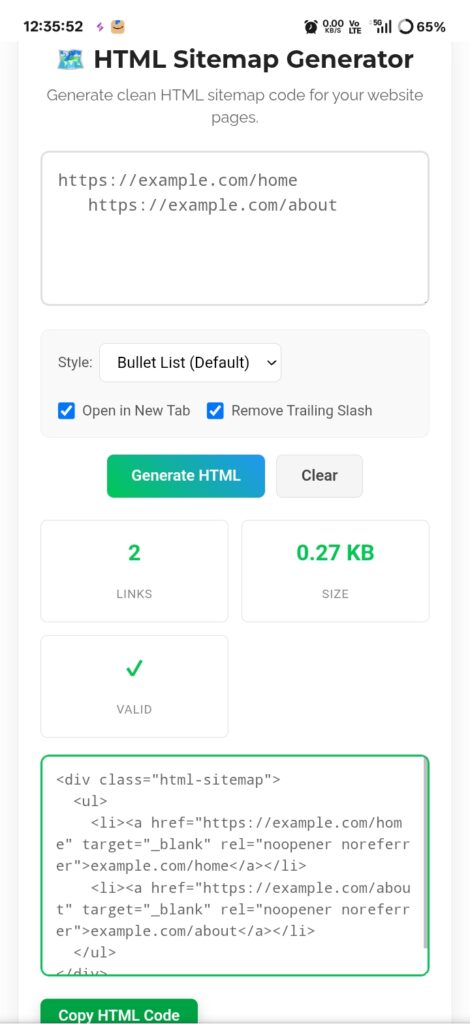
Let’s be honest — when most people hear “sitemap,” their eyes glaze over. They picture some boring XML file buried in their server that Google bots occasionally sniff around. Useful for robots, invisible to humans. But here’s the thing nobody talks about enough: a well-designed HTML Sitemap is actually for your visitors. Real people. The ones who land on your homepage, can’t find what they want in your fancy dropdown menu, and are about to bounce. An HTML sitemap is your safety net. A clean, clickable directory of everything you offer. And honestly? Most websites are missing this completely.
XML vs HTML — Know the Difference
Quick breakdown because people mix these up constantly:
XML Sitemap — Robots only. Hidden file with tags that tells Google “hey, these pages exist.” Zero human readability. If you opened it in a browser, you’d see code soup.
HTML Sitemap — Actual webpage. Visible. Clickable. Usually a bulleted list or grid layout that humans can actually use. When someone’s lost on your site, this is where they land.
I always tell clients: XML is for Google, HTML is for people. You need both, but the HTML one is what saves you from frustrated visitors who couldn’t figure out your navigation menu.
Why This Actually Matters
Internal linking juice — Every link in your sitemap passes authority to other pages. It’s like a voting system where you tell Google “these pages matter too.” I’ve seen deep content pages start ranking just because the sitemap gave them some link love they weren’t getting elsewhere.
User retention — Someone lands on your site, your menu confuses them, they don’t see what they need immediately. Without a sitemap? Gone. Bounce. With a sitemap? They find the exact page in seconds. Time on site goes up. Bounce rate drops. Google notices.
Accessibility — This one’s huge and underrated. Screen readers struggle with complex dropdown menus and hover effects. A simple bulleted list of links? They parse that flawlessly. Older browsers too. You’re not just helping SEO; you’re actually making your site usable for everyone.
How I Actually Build These
Most sites don’t need anything fancy. I use the generator, plug in my URLs, pick a clean style — usually a simple bullet list — and generate the HTML code. Paste it onto a dedicated /sitemap.html page. Link it in the footer where people can actually find it.
The key part everyone forgets: update it. I set a calendar reminder monthly to check if new posts or pages need adding. A sitemap with broken links or missing content is worse than no sitemap at all. It looks abandoned. Unprofessional. Don’t let that happen.
My Honest Take?
Navigation is underrated SEO. Everyone obsesses over keywords and backlinks, but if visitors can’t find your content, none of that matters. An HTML sitemap is like a friendly concierge for your website — “Lost? Here’s everything we have. Pick what you need.” It’s low effort, high impact, and most of your competitors probably don’t have one. That’s your edge.
Go build a sitemap page before your next visitor gets lost and leaves forever. https://seobricxtool.com/4874-2/
