
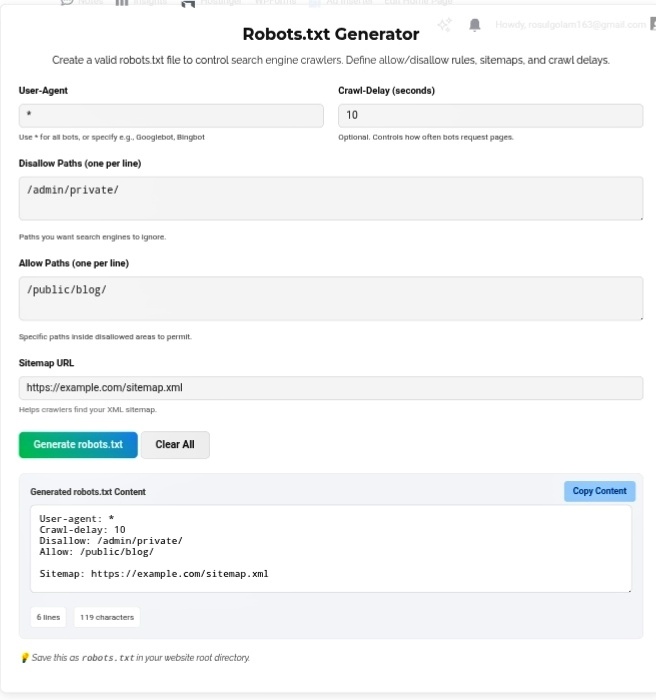
Let’s talk about the most powerful file on your website that you’ve probably never touched. It’s 10 lines long, weighs basically nothing, and can literally make or break your entire SEO strategy overnight. I’m talking about robots.txt — the gatekeeper file that every search engine bot reads before doing anything else on your site. Googlebot shows up, checks this file first, and decides “okay, I’m allowed here, blocked there.” Mess it up? Your entire site disappears from search. No warnings, no appeals, just gone. That’s why a Robots.txt Generator isn’t just helpful — it’s basically insurance against accidentally nuking your own traffic.
Why This Tiny File Actually Matters
Most people ignore robots.txt until something breaks. Then they panic. Here’s why you should care before that happens:
Crawl budget — Google doesn’t crawl your entire site every time. It has a budget. On large sites, every wasted crawl on some useless tag page or admin folder is a crawl that didn’t reach your money pages. Block the junk, direct bots to what actually matters. I’ve seen e-commerce sites double their indexed pages just by cleaning up robots.txt. Same server, same content, better instructions.
Security — Look, robots.txt isn’t a password. Anyone can read it. But it stops bots from casually scanning sensitive directories. /private-data/ , /config/ , /wp-admin/ — why let Google index what shouldn’t be public? It’s not real security, but it’s a first line of defense that costs zero effort.
Duplicate content — Got mobile and desktop versions of the same page? Different URL parameters for sorting? Without robots.txt, Google sees duplicates and gets confused about which to rank. Tell it which version matters. Save yourself from self-inflicted ranking penalties.
The Mistakes That Destroy Sites
I’ve seen people accidentally block their entire site with one wrong line. Disallow: / — that’s it. Every bot on the internet gets told “go away.” Traffic drops to zero overnight. I’ve had clients call me in tears because their developer “fixed something” and added that line. Took days to recover.
Another classic: blocking /css/ or /js/ . Google needs to see your stylesheets to understand how your page renders. Block those and Google thinks your site is broken. Rankings tank. All because someone didn’t understand what they were doing.
The generator prevents this. It builds proper syntax, validates your rules, and makes sure you’re not accidentally telling Google to ignore everything.
How to Actually Use It
When you fire up the generator, know what you want:
User-Agent — * means all bots. Googlebot means just Google. Be specific or be broad, but know the difference.
Allow/Disallow — List exactly what to protect. Don’t guess. I’ve seen people block /images/ and wonder why their product photos stopped showing up in image search.
Sitemap reference — Always add your XML sitemap URL. It’s like leaving a map for bots. “Here’s what I want you to find.” Without it, they’re wandering blind.
My Honest Take?
robots.txt is the definition of “small file, massive impact.” One wrong character and you’re invisible. One right configuration and you’re directing traffic exactly where you want it. The generator removes the guesswork — no syntax errors, no accidental blocks, no 3 AM panic attacks because your site vanished from Google. Treat this file with respect. It’s literally your direct line of communication with every search engine on the planet.
Go set up your robots.txt properly before something breaks. Future you will sleep better. https://seobricxtool.com/4866-2/
