
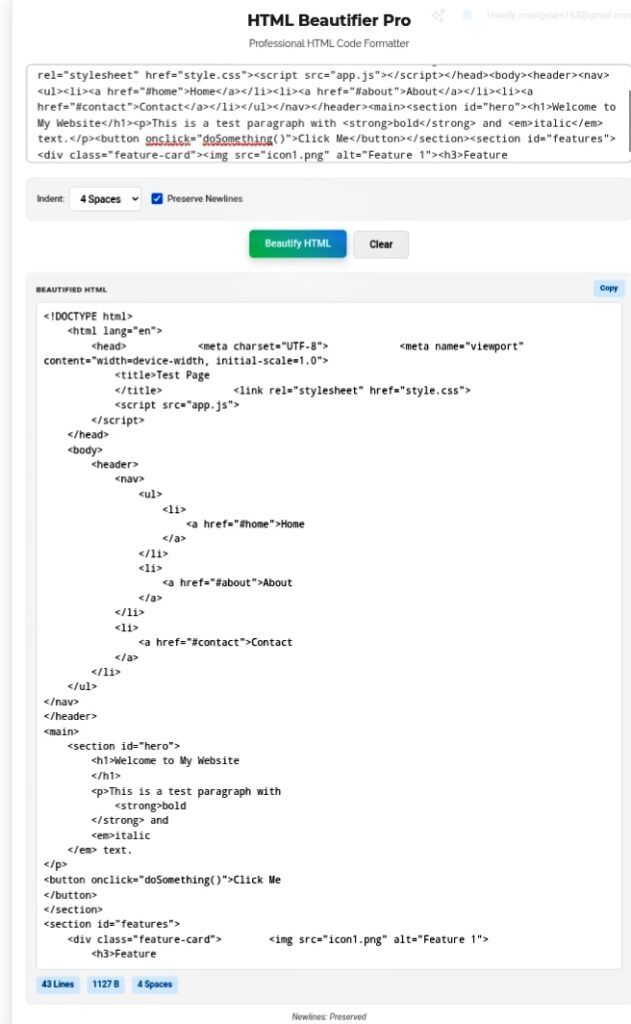
You know that moment when you paste a chunk of HTML into your editor and it’s just… a wall. One massive, unbroken line of angle brackets and attributes that stretches forever. No spaces. No indentation. No hope. Maybe it’s a minified script from some CDN. Maybe it’s a CMS export that got mangled. Maybe you grabbed it from StackOverflow at 2 AM and now you’re staring at what looks like alphabet soup had a baby with a keyboard smash. I’ve been there. It’s genuinely painful. That’s exactly why HTML Beautifier Pro isn’t just another tool — it’s basically a sanity preservation device for anyone who touches code regularly.
Why Your Brain Needs Structure
Look, browsers don’t care. They’ll parse a solid block of compressed gibberish just fine. But human eyes? We need hierarchy. We need to see what’s nested inside what. When you’re staring at
- all crammed together with zero whitespace, your brain just gives up. Debugging becomes torture. Finding a missing
in 100 lines of unindented code? I’ve spent literal hours hunting for one stupid closing tag that was hiding in plain sight. The beautifier makes it visible instantly. Parent tags align. Child tags indent. Missing closings stick out like a sore thumb. Team collaboration falls apart without consistent formatting. I’ve worked on projects where three developers touched the same file. One used tabs, one used spaces, one apparently formatted by throwing their keyboard down stairs. Git commits were a mess. Pull requests were unreadable. Standardized formatting fixes this. Everyone sees the same structure. Code reviews stop being painful. What This Actually Does The beautifier isn’t just adding random spaces. It’s a structural architect. It parses your raw mess and rebuilds it with actual logic: Indentation control — Set your preference. 2 spaces, 4 spaces, tabs, whatever. Your code aligns vertically with its parent tags. Suddenly you can see the hierarchy without squinting. Tag separation — Opening and closing tags get their own lines. You can visually match them up. No more “does this
close this div or that div?” confusion.
Attribute handling — Attributes stay with their tags but distinct elements break onto separate lines. Clean, compact, but never overlapping. Readable without being wasteful.
Where I Actually Use This
Template analysis — Bought a WordPress theme or Bootstrap template? Core files are usually minified to save space. Run them through the beautifier first. Suddenly you can actually see how the layout is constructed before you start hacking at it. I’ve saved myself from breaking entire templates just by understanding the structure first.
Learning and teaching — Students paste their buggy code in, hit beautify, and instantly see what’s properly nested versus what’s “hanging” — tags that never got closed, elements nested wrong. Visual feedback beats verbal explanation every time.
CMS cleanup — Older website editors are notorious for outputting garbage HTML. Copy it out, beautify it, paste it back. Layout stays stable when you update later. No more “why did everything break when I changed one sentence?” mysteries.
Why “Pro” Actually Matters
Basic formatters choke on complex stuff. Mixed CSS classes, inline scripts, HTML comments — they either break things or strip them out. The Pro version handles edge cases gracefully. Comments stay intact. Script blocks preserve their functionality. The HTML around them gets organized without touching what’s inside. Your code works exactly the same, just looks like someone competent wrote it.
My Honest Take?
Messy code is debt. Technical debt that compounds every time you touch the file. Spending thirty seconds to beautify saves hours of debugging later. Hours. I’ve tracked this. Clean files get updated faster. Bugs get found quicker. New team members understand the codebase without asking a thousand questions. HTML Beautifier Pro isn’t about making things pretty — it’s about making them maintainable. In a world where you’re already juggling deadlines, that’s not a luxury. It’s survival.
Go beautify that mess before you touch another line. Your future self will thank you. https://seobricxtool.com/4894-2/
