
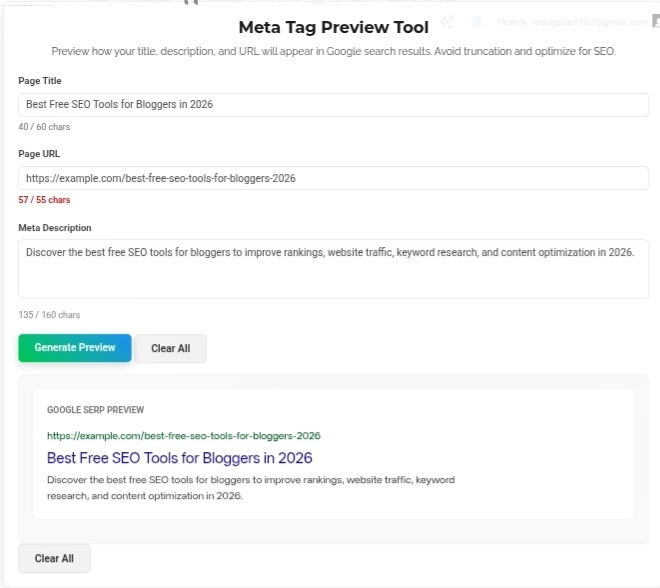
Let’s talk about the invisible battle happening every single day on Google. You search for something, you get a page of results, and in about two seconds you’ve decided which link to click. Maybe three. Those few seconds? That’s the entire war. And most website owners are losing it without even realizing. Your SERP Snippet — that little combo of headline, URL, and description — is literally your ad copy for organic search. Boring, truncated, or irrelevant? Scrolled past. Forgotten. Dead. The Meta Tag Preview Tool is how you stop guessing and start winning those micro-moments.
Why This Actually Matters (More Than You Think)
For years, optimizing meta tags was basically gambling. You’d write a title and description, hit publish, and wait weeks to see how it looked in actual search results. By then, if Google cut off your clever headline mid-word with an ellipsis? Too bad. That valuable real estate? Wasted. Your competitor’s properly formatted snippet? Getting all the clicks.
Here’s the thing people miss — user experience is a direct ranking factor now. Google tracks engagement. Click-Through Rate matters. If your meta description pulls someone in while your competitor’s looks broken or keyword-stuffed, you win the traffic. Even if their content is technically better. I’ve seen weaker articles outrank stronger ones purely because their snippet was more clickable. The preview tool fixes this before you ever go live.
How It Actually Works
No more guessing. No more “hope for the best.” The tool simulates exactly how Google renders your result.
Visual simulation — You see the green URL, the blue headline, the grey description. Exactly as they’ll appear. Your brand voice, your messaging, your hook — all visible before you commit. I’ve caught awkward phrasing, truncated keywords, and weird spacing issues just from seeing the mockup. Saves so much embarrassment later.
Real-time character counting — Google has hard limits. The tool tracks them live:
Page title: ~50-60 characters max. Go over? Ellipsis city. Your carefully crafted headline becomes “Best SEO Tools for Bloggers in 2…” Pathetic.
Meta description: 150-160 characters sweet spot. Exceed it and your compelling closing line gets chopped. I’ve written what I thought was the perfect description, hit 165 characters, and watched the tool flag it. Trimmed five words, message stayed intact. That small edit probably saved me dozens of clicks.
The Strategic Stuff Nobody Talks About
Front-load your keywords — Seeing your headline clearly lets you make sure your primary keyword sits in those first 60 characters. Mobile users especially see even less. If your keyword is buried at the end? They never see it. Front-load or die.
Avoid truncation pain — There’s genuinely nothing more frustrating than writing a witty, compelling description and having Google cut it off mid-sentence. The tool alerts you as you approach limits. Trim the fat. Deliver complete messages every time. I’ve stopped counting how many times this saved me from publishing broken-looking snippets.
Mobile awareness — The tool shows desktop, but the lessons apply everywhere. Mobile screens are narrow. What looks fine on your monitor might look massive on a phone. Keeping things concise isn’t just good practice — it’s survival. Short titles, tight descriptions, clear value. Works on every device.
My Honest Take?
Your meta tags are ad copy. Pure and simple. The only difference? You’re not paying per click. But you’re absolutely paying in lost traffic if they’re bad. Every old blog post you update, every new service page you launch — run it through the preview tool first. Polish the headline. Tighten the description. Make sure nothing gets cut off. That top-of-Google real estate is the most valuable advertising space you own. Don’t leave it to chance. Don’t let Google guess. Control exactly how your brand appears, every single time.
Go preview your next snippet before you publish. Your click-through rate depends on it. https://seobricxtool.com/4862-2/
