
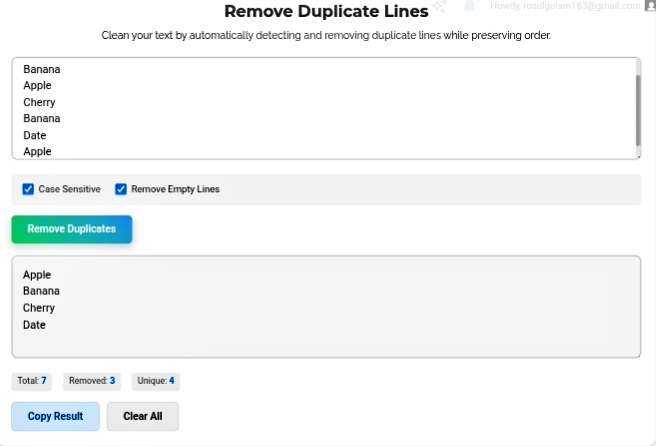
Let’s be real — duplicates are everywhere. And they’re annoying. Like, genuinely frustrating. You copy a contact list from three different sources, paste them together, and suddenly “john@email.com” shows up seven times. Or you’re organizing research citations and the same paper appears in your list twice because you saved it from two different databases. In programming? Duplicate variable names or database keys can straight up crash your system. I’ve been there. Debugging for hours only to realize I declared the same variable twice. Embarrassing. The Remove Duplicate Lines tool fixes this instantly. Paste your mess, hit clean, get back only unique entries. And here’s the best part — it keeps the original order. First instance stays, duplicates vanish. No chaos, no reorganization needed.
Why Clean Data Actually Matters
Look, duplicates aren’t just ugly. They’re actively harmful. In marketing, emailing the same person multiple times? Spam complaints. Damaged sender reputation. Your deliverability tanks. I’ve watched email campaigns get blacklisted because nobody cleaned the list first.
In programming, duplicate keys or variables cause logic errors that are nightmare to trace. System crashes. Weird behavior. Hours of debugging for something that a simple deduplication would have prevented.
Even in analytics, duplicate rows skew your numbers. Suddenly your “unique visitors” count is inflated, your conversion rates look wrong, and you’re making decisions based on garbage data. Clean data isn’t a luxury — it’s the foundation of everything else working properly.
How It Actually Works
The tool scans line by line. Sees something new? Keeps it. Sees it again? Deletes it. Simple concept, but the execution matters. What makes this one actually useful is the order preservation. The first instance of each item stays exactly where it was. Your logical flow remains intact. You’re not getting alphabetized results or random shuffles — just your original list, minus the repeats.
I’ve used tools that sort while deduplicating. Drives me crazy. My carefully ordered workflow gets destroyed. This one respects your structure. Huge difference.
The Controls That Actually Matter
Case sensitivity toggle — “Apple” vs “apple”. In most lists? Same thing. In code? Completely different. The tool lets you decide. I’ve used it both ways depending on whether I’m cleaning a grocery list or debugging CSS classes. Flexibility matters.
Empty line removal — Copy-paste from multiple sources always leaves blank lines. Random gaps that break sorting and make lists look messy. The tool strips them automatically. Compact, professional output. No manual hunting for invisible line breaks.
Real-time stats — Total lines processed. Duplicates removed. Unique lines remaining. Immediate feedback. I love seeing “47 duplicates removed” because it validates that yes, my data was actually messy and yes, the tool just saved me from that mess. Transparency builds trust.
Where I Actually Use This
Email marketing — Before every campaign, I run subscriber lists through this. Spam complaints dropped to basically zero once I made this a habit. Accurate metrics. Happy subscribers.
Software development — Deduplicating variable names, CSS classes, API endpoints before writing code. Prevents conflicts before they happen. I’ve caught duplicate class names that would’ve broken entire stylesheets.
Academic work — Bibliographies are notorious for accidental repeats. Same source, different databases, copied twice. Running through the tool catches what my eyes miss after staring at citations for hours.
Data prep — Raw datasets need unique rows before analysis. Every duplicate observation throws off statistical models. Clean first, analyze second. Non-negotiable.
My Honest Take?
Manual duplicate removal is a special kind of torture. Scrolling, comparing, deleting, realizing you missed one, starting over. The Remove Duplicate Lines tool eliminates that completely. Paste, process, done. Your data stays clean, your workflow stays fast, and your sanity stays intact. In a world where everyone’s obsessed with fancy analytics and AI tools, sometimes the most powerful thing you can do is just… remove the junk. Basics matter. This tool nails the basics.
Go clean that list you’ve been avoiding. Your future self will thank you. https://seobricxtool.com/4835-2/
