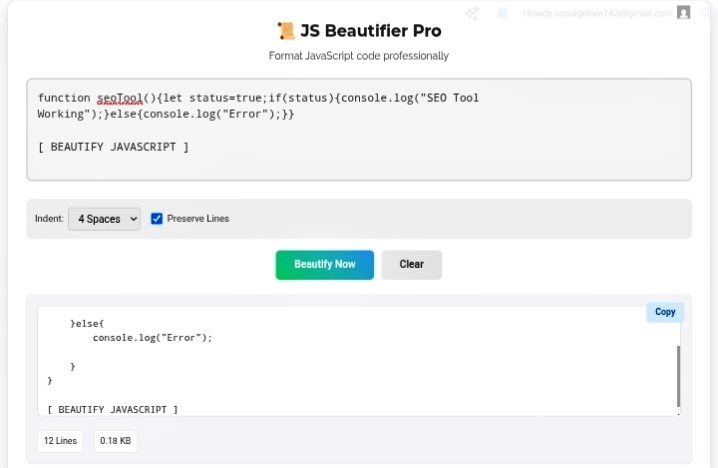
Let’s talk about every developer’s nightmare. You inherit a project, open the JavaScript file, and it’s just… chaos. One massive line. Variables named a , b , c . Functions compressed into unreadable blobs. Maybe it’s minified code from a CDN. Maybe it’s something a previous developer “wrote” in a panic at 2 AM. Either way, you need to fix a bug and you can’t even tell where one function ends and another begins. That’s where the JS Beautifier becomes your best friend. It takes that spaghetti mess and turns it into actual readable, logical, debuggable code.
Seeing the Structure Again
Programming is all about syntax — curly braces, parentheses, semicolons. When everything gets minified, it all collapses into one line of gibberish. You can’t see where a function starts, where a loop ends, or which variables belong to what. It’s like trying to read a book where someone removed all the spaces and punctuation.
The beautifier parses the actual logic and reinserts proper indentation. Suddenly you can see scope again. That variable x ? It’s local to this function, not global. That loop? It ends here, not there. I’ve caught so many bugs just because the formatted code made the structure obvious. Scope errors, variable leaks, nested callbacks from hell — all visible once the indentation is right.
Debugging Without Losing Your Mind
Website crashes. Console throws some cryptic error at line 1, column 847. Great. In minified code, “line 1, column 847” is basically useless. You’re staring at a wall of characters trying to find where things went wrong.
Beautify first. Always. It creates a map of your application’s logic. You can trace execution paths step by step. See your if/else blocks clearly. Verify those mathematical operations without squinting. Last week I had a production bug that was costing money every hour. Minified code hid the issue completely. Beautified it, spotted the missing bracket in thirty seconds. Thirty seconds versus potentially hours of hunting. That’s the difference.
Copy-Paste Reality Check
Be honest — how much of your code comes from StackOverflow? Or documentation examples? Or that GitHub issue where someone posted a “quick fix”? We all do it. But those snippets aren’t always formatted for your project. Tabs mixed with spaces. Inconsistent indentation. Random line breaks.
Run them through the beautifier before integrating. Suddenly they match your coding standards. Your repository looks professional instead of like a Frankenstein monster of random formatting. Code reviews go smoother. Teammates don’t silently judge your file structure. Everyone wins.
My Honest Take?
Minified JavaScript is for machines. Beautiful JavaScript is for humans. The JS Beautifier doesn’t change what your code does — it changes whether you can understand what your code does. In a world where you’re debugging at midnight because something broke in production, that readability isn’t a luxury. It’s survival.
Go beautify that mess before you touch another line. Your sanity depends on it.