
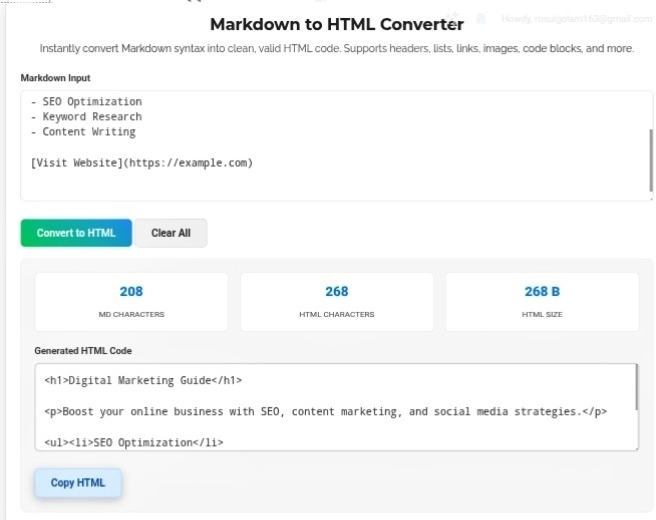
, “Result? No mental overhead. Here’s what actually happens when you run it through the converter: Input: # My Title Output: My Title
The tool parses your simple text and spits out clean, semantic HTML that search engines actually understand. Headers are headers. Paragraphs are paragraphs. Links are links. No guesswork. No broken nesting. Just valid code that works.
What This Tool Actually Handles
It’s not just a dumb text swapper. The converter gets the details right:
Links — Your Click Here becomes a proper clickable tag. Seamlessly. No manual tag typing.
Images — Markdown image syntax converts into full tags with alt text included. Accessibility handled without you even trying.
Character counting — This part is weirdly satisfying. The tool shows you exactly how much “code bloat” gets added behind the scenes. Your 200-character Markdown draft becomes 340 characters of HTML. Seeing those numbers helps you understand why raw HTML feels so heavy to write.
Where People Actually Use This
GitHub READMEs — You wrote this beautiful Markdown README for your project. Now you need it on your personal portfolio site. Convert it to HTML, paste it in, done. No rewriting.
Learning Management Systems — Some platforms eat Markdown. Others demand HTML. Instead of learning two formats, write in Markdown and convert when needed. Universal translator. Saves so much time.
Blogging workflow — I write everything in Notion or Obsidian first. Distraction-free, no CMS clutter. When the draft is ready, I convert to HTML and paste it straight into WordPress or Ghost. No formatting lost. No weird spacing issues. Clean handoff every time.
My Honest Take?
Web publishing shouldn’t require a computer science degree. Markdown proves that. You focus on what you’re actually saying instead of wrestling with syntax. The Markdown to HTML Converter is the bridge — you write like a human, it outputs like a machine. Professional, accessible, search-engine-friendly code from simple text. That’s not just convenient; it’s how content creation should work in 2026.
Go turn your notes into real web code. You’ll wonder why you ever typed angle brackets.
Let’s be honest — HTML is a pain if you’re not a developer. You want to write a simple blog post, and suddenly you’re googling whether it’s
or
, or why your heading looks weird because you forgot to close a tag. It’s exhausting. That’s exactly why Markdown exists. It’s basically the “write-only” language that doesn’t fight you. No angle brackets, no closing tags, no syntax anxiety. Just type and go. The Markdown to HTML Converter is what takes that simplicity and turns it into actual web-ready code. Bloggers love it. Educators swear by it. Technical writers? They’d probably quit without it.
Why Markdown Just Feels Better
Look, the beauty of Markdown is that it maps to HTML without you thinking about HTML. You want a heading? Type # My Title . Want a list? Use dashes. Links? Square brackets and parentheses. That’s it. No https://seobricxtool.com/4896-2/
