
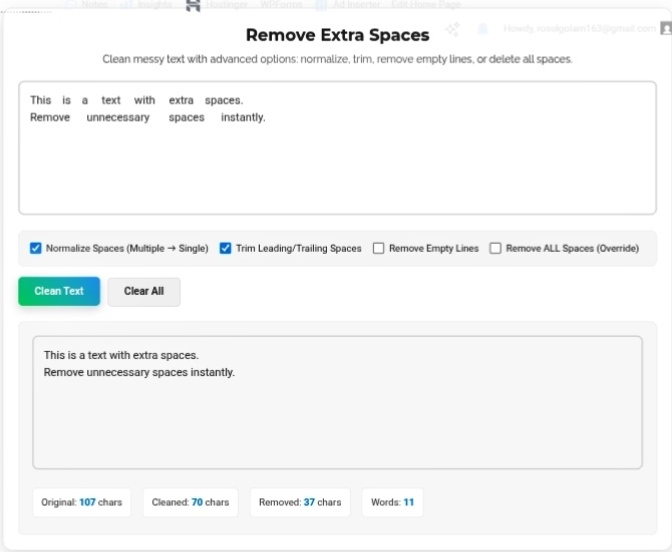
You know that feeling when you paste something from a PDF or website and suddenly your document looks weird—stretched paragraphs, messy spacing, broken alignment? Most of the time, that’s just sneaky extra spaces or random line breaks lurking in your text. The Remove Extra Spaces tool pretty much acts like your digital cleaning crew, scrubbing those messes away so everything looks clean, efficient, and works wherever you need.
The Hidden Formatting Sabotage
People don’t usually notice how whitespace messes things up. Multiple spaces aren’t just an eyesore—they can actually eat up storage (not a big deal unless you’re dealing with piles of records) and ruin the layout. In web design, dropping extra spaces inside HTML can wreck CSS styling in ways you don’t notice until everything looks off. For basic text, ridiculous gaps throw off bots that are trying to parse or scrape data—it’s like giving them a puzzle they didn’t ask for.
Why Coders Get Obsessed with “Trimming”
If you code, you want stuff tidy. It’s not just OCD—one stray space in your syntax (like tossing a space inside a URL: http ://www.site.com or inside a filename: My Document.txt) can wipe out your whole application.
- Leading/Trailing Whitespace: These are the spaces snuggling up to the start or end of a line. They’re basically useless, and they mess up things like database matches.
- Normalization: Turning a blob of spaces between words into just one makes everything consistent—width, wrapping, and all those mobile screen headaches calm down.
When Regular Folks Need the Cleanup
- Resume & Cover Letter Polish: Old websites and pasted job descriptions always drag along weird, uneven spacing. Quick space cleanup and your CV actually looks professional.
- Importing Flat Files: Uploading a CSV full of addresses? If your rows have random spaces, validation fails—a cleanup beforehand means fewer upload nightmares.
- Transcribing Audio or AI Text: Machines often drop weird pauses as piles of spaces. Cleaning those out brings the natural flow back.
- Getting Ready for Print: Sending a book to a printer or prepping for a publishing platform? Scrubbing invisible errors saves you from pointless rejection.
What Actually Happens When You Run It
A proper space remover doesn’t just delete like a bulldozer—it’s got options:
- Normalize Spaces: Smashes five spaces into just one.
- Trim Edges: Cleans up invisible padding at the start and end.
- Delete Empty Lines: Wipes out leftover blank lines from chunk removal.
- Full Clear (Advanced): Goes nuclear—removes all spaces (handy if you’re making a cipher or something sneaky).
The Bottom Line
Perfection online is all about the little stuff—pixels, bytes, and stray characters. One extra space can break your code, throw off your layout, and drive readers nuts. Space-cleaning tools are like brushing your teeth for your text—a tiny effort, but your whole work looks smooth and works everywhere.
Give your text a proper clean and keep your formatting flawless. https://seobricxtool.com/4837-2/
